Get in touch
I'm always excited to take on new projects and collaborate with innovative minds.
Phone
Email
Website
I'm always excited to take on new projects and collaborate with innovative minds.
A comprehensive guide to the Advanced Code Editor - Online IDE, a powerful browser-based development environment that supports multiple programming languages with real-time execution, syntax highlighting, and integrated terminal capabilities.
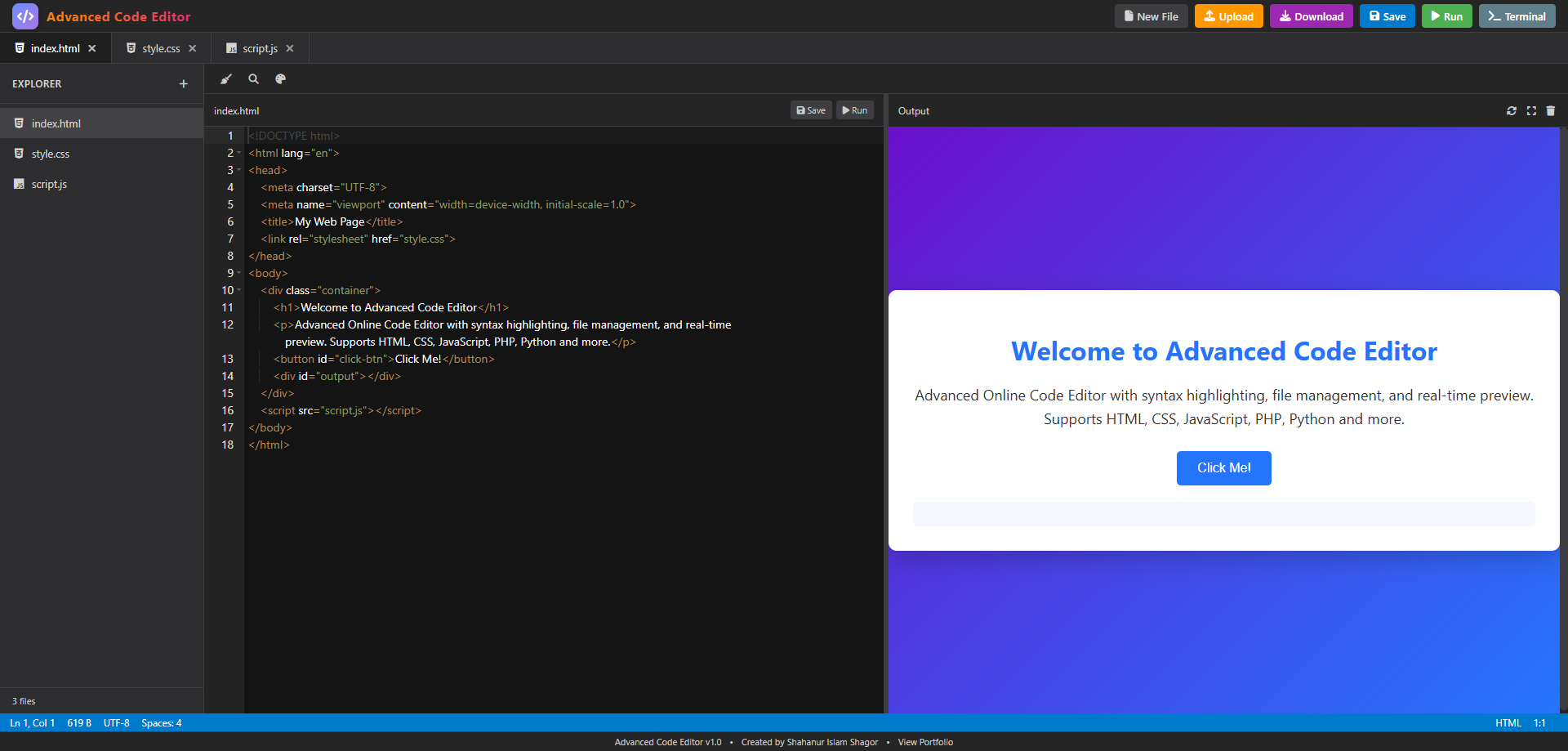
A comprehensive guide to the powerful browser-based development environment that supports multiple programming languages with real-time execution and preview
In today's digital landscape, having access to a powerful, web-based code editor is essential for developers of all levels. The Advanced Code Editor - Online IDE is a feature-rich, browser-based development environment that brings professional coding capabilities right to your web browser.
This comprehensive online Integrated Development Environment (IDE) supports multiple programming languages including HTML, CSS, JavaScript, PHP, Python, Java, C++, and many more. Built with modern web technologies, it provides a seamless coding experience comparable to desktop IDEs.
Whether you're learning to code, teaching programming concepts, or need a quick environment for prototyping, this tool provides everything you need without any installation requirements.
Supports HTML, CSS, JavaScript, PHP, Python, Java, C++, and many more programming languages and frameworks.
Clean, VS Code-inspired interface with file explorer, tabs, and resizable panels for optimal workflow.
Execute code directly in the browser with instant feedback and comprehensive output display.
Syntax highlighting, auto-completion, code formatting, and find/replace functionality.
Built-in terminal with support for file operations, package management, and direct code execution.
Create, manage, and export multi-file projects with dependencies between HTML, CSS, and JavaScript files.
The Advanced Code Editor supports a wide range of programming languages and technologies:
Each language comes with appropriate syntax highlighting, code completion, and execution capabilities where applicable.
When you run HTML files, the editor automatically combines all linked CSS and JavaScript files into a single preview:
Renders a fully functional web page in the preview panel with all styles and interactions applied.
Server-side languages like Python can be executed directly in the browser:
Factorial of 5 is: 120
PHP code is executed with proper server-side processing:
The sum is: 15
The editor provides clear error messages and debugging information:
Infinity
NameError: name 'undefined_variable' is not defined
The built-in terminal provides a command-line interface for various operations:
The terminal supports file operations, package management, direct code execution, and navigation between directories.
The application is built with a clean separation of concerns:
The application maintains a comprehensive state object tracking:
Uses the powerful ACE editor with:
The run.js file implements a sophisticated execution system:
| Feature | Advanced Code Editor | Traditional Desktop IDE |
|---|---|---|
| Setup Required | None | Download and Installation |
| Accessibility | Any device with a browser | Limited to installed devices |
| Execution Environment | Browser-based with external APIs | Local machine with full system access |
| Project Persistence | Browser storage or manual export | Direct file system access |
The Advanced Code Editor - Online IDE represents a significant step forward in web-based development tools. It combines the power of traditional IDEs with the accessibility of web applications, making professional coding tools available to everyone with a web browser.
Whether you're a beginner learning to code, a teacher demonstrating programming concepts, or a professional needing a quick coding environment, this tool provides everything you need in one package. The seamless integration of editing, execution, and preview capabilities creates a holistic development experience that rivals many desktop applications.
Your email address will not be published. Required fields are marked *
-1.png)
-1200x800.png)
-1200x800.png)
-1200x800.png)